Reviews

  • Is the Magic Keyboard and Mouse Really the Best for Your Mac?

    If you just bought a shiny new Mac, congratulations—you’re now in the Apple ecosystem, where everything is sleek, minimal, and costs a little more than it probably should. And if you’re like most people, Apple is gently nudging you toward the Magic Keyboard and Magic Mouse. They match. They connect effortlessly. They look like they came from the future. But here’s the big question: are they actually the best tools for the job, or just the prettiest?

    Let’s talk about it.

    The Magic Keyboard is Apple’s take on modern typing. It’s slim, quiet, and made of aluminum, which is basically Apple’s way of saying, “this is premium.” It feels good, but not amazing. Typing is soft and flat—almost too flat for some. It’s great for casual use or writing short emails, but if you’re hammering out documents or coding all day, your fingers might be craving more feedback. It also charges via Lightning cable, which is kind of hilarious at this point. USB-C is right there, Apple.

    Then there’s the Magic Mouse—Apple’s most controversial accessory since the butterfly keyboard. Sure, it looks beautiful. It’s smooth and minimal and does those slick multitouch gestures like swiping between desktops and smooth scrolling. But if you’ve ever used one for more than a few hours, you know the truth: it’s not exactly comfortable. It’s flat. Too flat. It feels like Apple designed it with a ruler instead of a hand.

    And yes, the charging port is still on the bottom, which means when it dies, it becomes a tiny silver paperweight until it’s done sipping juice. Beautiful design, questionable execution.

    So what’s the alternative?

    A lot of people are switching to third-party accessories—especially those who care about comfort or type for a living. Logitech’s MX Keys and MX Master series are the go-to picks for a reason. They’re more ergonomic, customizable, and they just feel better. Keychron’s mechanical keyboards are another favorite, especially among people who love the clack of real switches. They’re wireless, Mac-compatible, and look good without trying too hard.

    If you love Apple’s gesture support but hate the Magic Mouse, the Magic Trackpad is surprisingly underrated. It gives you all the swipes, pinches, and taps in a more natural, wrist-friendly format. It’s like the Magic Mouse finally learned how to relax.

    Bottom line? The Magic Keyboard and Mouse aren’t bad. They’re solid. But they’re also designed for looks and simplicity more than comfort or long sessions of productivity. If that’s your vibe, go for it. But if you’re serious about typing, editing, designing, or just want your wrists to stop yelling at you, there are better tools out there—and they don’t have to ruin the Apple aesthetic.

    Your Mac deserves more than just a pretty face. So do your hands.

  • Baseus PrimeTrip VR2 Max

    Introducing the Baseus PrimeTrip VR2 Max: The Ultimate Road Companion

    Ever found yourself on a road trip, juggling multiple devices, each pleading for a charge like toddlers demanding attention? Enter the Baseus PrimeTrip VR2 Max, a car charger so advanced, it might just qualify for its own driver’s license.

    A Tangled Past

    Remember the dark ages of car charging? A single USB port, a mess of cables, and the inevitable “Who’s got the charger next?” debates. It was a time when charging your laptop in the car was as plausible as finding a unicorn in your glove compartment.

    The Dawn of Charging Enlightenment

    Fast forward to today, and behold the Baseus PrimeTrip VR2 Max. This isn’t just a car charger; it’s a mobile power station. Featuring:

    • Dual Retractable USB-C Cables: Over 31 inches of reach, these cables gracefully retract when not in use, eliminating the spaghetti junction in your vehicle.
    • Additional Ports: An extra USB-A and USB-C port ensure that even your passengers’ devices won’t feel left out.
    • Power Galore: Delivering a total of up to 240W, with a single port capable of outputting 105W, it’s robust enough to charge power-hungry laptops on the go.

    Why You’ll Love It

    Imagine cruising down the highway, your laptop charging seamlessly as you dictate emails to your virtual assistant. No more pit stops at dubious coffee shops just to juice up your devices. The Baseus PrimeTrip VR2 Max transforms your car into a productivity hub, or at the very least, ensures your devices are ready for the next Netflix binge at the motel.

    The Waiting Game

    Eager to get your hands on this marvel? Patience, dear tech enthusiast. The Baseus PrimeTrip VR2 Max is expected to hit the shelves in April 2025, priced at a modest $44.99. 

    Final Thoughts

    In a world where our devices are as vital as our morning coffee, the Baseus PrimeTrip VR2 Max stands out as the unsung hero of road trips. Say goodbye to low battery anxiety and hello to uninterrupted connectivity. Just remember, while your gadgets are charging at lightning speed, keep your eyes on the road—this charger, impressive as it is, won’t drive for you.

  • Xbox Series S

    The Xbox Series S looks like the intern of next-gen consoles—smaller, quieter, and probably doing 90% of the work for half the pay. It’s the kind of device that makes you question how much horsepower you really need when you just want to game and chill. At roughly the size of a hefty novel (or a really ambitious sandwich), it slips into any setup without demanding the spotlight. Sure, it might look like a Bluetooth speaker had an identity crisis, but it owns the look with confidence.

    Despite its modest shell, this console isn’t slacking off under the hood. With a custom AMD Zen 2 CPU and a GPU pushing 4 teraflops, the Series S handles 1440p gaming like a champ, often with buttery frame rates up to 120fps. It’s not gunning for 4K glory like its bigger sibling, the Series X, but unless you’ve got a magnifying glass taped to your face, you might not care. Games load fast, play smooth, and look solid. It’s like getting steakhouse performance from a food truck.

    Now, the catch: storage. The Series S gives you a 512GB SSD, which sounds fine until you realize you’re only getting about 364GB of usable space. That’s cute—until Call of Duty alone takes up enough real estate to evict three other games. Swapping titles in and out becomes a lifestyle. There’s an official expansion card, but it costs almost as much as the console itself. Budget-friendly starts to feel a little “terms and conditions apply.”

    Game Pass is where the Series S really flexes. Microsoft’s all-you-can-play buffet makes this console a Trojan horse of gaming value. It’s like Netflix for gamers, except instead of watching six hours of reality TV, you can play StarfieldHalo Infinite, or Forza Horizon 5—often on day one. Toss in cloud gaming and suddenly this little machine can punch way above its weight without breaking a sweat (or your wallet).

    So… the verdict. To buy or not to buy?

    If you’re after 4K visuals, massive storage, and flexing your GPU in front of your friends—maybe aim higher. But if you’re a casual-to-serious gamer who values value, convenience, and a console that won’t try to eat your entire entertainment center, the Xbox Series S is kind of a no-brainer. It’s like finding out the smallest dog in the litter can do backflips. Sure, it’s not perfect, but it’s scrappy, charming, and knows exactly what it’s doing.

  • Logitech MX Master 3s

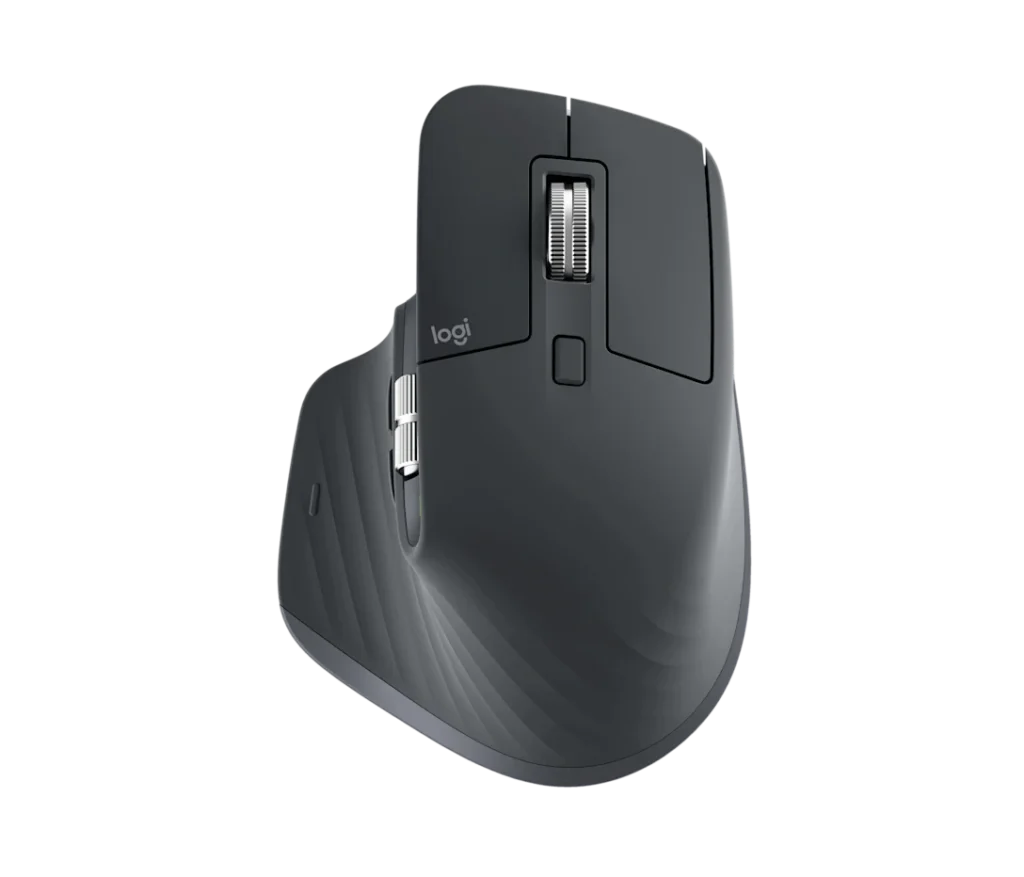
    Ah, the Logitech MX Master 3S—a mouse so sophisticated, it probably fills out its own tax returns. Let’s embark on a whimsical journey through its features, quirks, and the existential questions it might pose to your current desk setup.

    Imagine a mouse that nestles into your hand like it was always meant to be there. The MX Master 3S boasts an ergonomic design that feels like a firm handshake from an old friend—assuming that friend is right-handed. Lefties, unfortunately, might feel like they’ve been left out of the secret club once again.

    This mouse features not one, but two scroll wheels. The primary wheel, crafted from milled metal, offers both ratchet and free-spinning modes, allowing you to zip through 1,000 lines per second or navigate line-by-line with precision. It’s like having a sports car that can also parallel park effortlessly. The secondary thumb wheel facilitates horizontal scrolling, perfect for wide spreadsheets or panoramic cat photos.

    Gone are the days of obnoxious clicking noises that announce your every move. The MX Master 3S introduces “Quiet Clicks,” reducing noise by 90% compared to its predecessor. Now, your late-night internet deep dives won’t disturb your sleeping partner—or your conscience.

    Equipped with an 8,000 DPI sensor, this mouse tracks on virtually any surface, including glass. While this level of sensitivity might be overkill for everyday tasks, it’s reassuring to know that if you ever find yourself editing a spreadsheet on a glass table in a high-speed train, the MX Master 3S has got you covered. ​

    With the Logi Options+ software, you can customize buttons and gestures to suit your workflow. Assign functions like copy, paste, or “order pizza” to specific buttons. While the software offers extensive customization, it might take some time to navigate its quirks—consider it a rite of passage into the MX Master 3S elite user group. ​

    Battery Life: The Marathon Runner

    Logitech claims up to 70 days of battery life on a full charge. In real-world terms, that’s approximately 69.5 more days than your wireless earbuds. And if you do find yourself running low, a quick one-minute charge provides up to three hours of use—just enough time to finish that last-minute project or squeeze in one more level. ​

    The Verdict: To Buy or Not to Buy

    At £119.99, the MX Master 3S is an investment in your productivity and comfort. It’s like hiring a personal assistant for your hand—minus the awkward small talk. If you’re a right-handed user seeking a feature-rich, comfortable, and nearly silent mouse, the MX Master 3S might just be your soulmate. Left-handed users, however, may need to keep searching for their perfect match.​

    In conclusion, the Logitech MX Master 3S doesn’t just point and click; it waltzes through your workflow with grace and efficiency. Just be prepared for your keyboard to get a little jealous.